
Following are the step to create a QR Code in Android Studio.
(1) Step – 1 : Add following two dependencies in build gradle.
implementation 'com.google.zxing:core:3.2.1'
implementation 'com.journeyapps:zxing-android-embedded:3.2.0@aar'
(2) Step – 2 : Now Create the layout for your application following is the example layout with an edit text, button and image view.
<?xml version="1.0" encoding="utf-8"?>
<LinearLayout xmlns:android="http://schemas.android.com/apk/res/android"
    xmlns:app="http://schemas.android.com/apk/res-auto"
    xmlns:tools="http://schemas.android.com/tools"
    android:layout_width="match_parent"
    android:layout_height="match_parent"
    android:orientation="vertical"
    tools:context=".MainActivity">

<EditText
    android:layout_width="match_parent"
    android:layout_height="wrap_content"
    android:id="@+id/edittext"
    android:hint="Text"
    />

    <Button
        android:layout_width="wrap_content"
        android:layout_height="wrap_content"
        android:id="@+id/button"
        android:text="Generate"
        />


    <ImageView
        android:layout_width="wrap_content"
        android:layout_height="wrap_content"
        android:id="@+id/imageview"
        android:layout_gravity="center"
        android:layout_marginTop="@dimen/_35sdp"
        />

</LinearLayout>
(3) Step – 3 : Now write the business logic to generate the QR-Code in your java file.
import androidx.appcompat.app.AppCompatActivity;

import android.graphics.Bitmap;
import android.os.Bundle;
import android.view.View;
import android.widget.Button;
import android.widget.EditText;
import android.widget.ImageView;

import com.google.zxing.BarcodeFormat;
import com.google.zxing.MultiFormatWriter;
import com.google.zxing.common.BitMatrix;
import com.journeyapps.barcodescanner.BarcodeEncoder;

public class MainActivity extends AppCompatActivity {

    EditText editText;
    Button button;
    ImageView imageView;

    @Override
    protected void onCreate(Bundle savedInstanceState) {
        super.onCreate(savedInstanceState);
        setContentView(R.layout.activity_main);

        editText = (EditText)findViewById(R.id.edittext);
        button = (Button)findViewById(R.id.button);
        imageView = (ImageView)findViewById(R.id.imageview);

        button.setOnClickListener(new View.OnClickListener() {
            @Override
            public void onClick(View view) {
                MultiFormatWriter multiFormatWriter = new MultiFormatWriter();

                try{
                    BitMatrix bitMatrix = multiFormatWriter.encode(editText.getText().toString(),BarcodeFormat.QR_CODE,500,500);
                    BarcodeEncoder barcodeEncoder = new BarcodeEncoder();
                    Bitmap bitmap = barcodeEncoder.createBitmap(bitMatrix);
                    imageView.setImageBitmap(bitmap);
                }catch (Exception e){
                    e.printStackTrace();
                }
            }
        });
    }

}
(4) This are the simple steps to generate a QR-Code in Android Studio following is the output of the program.
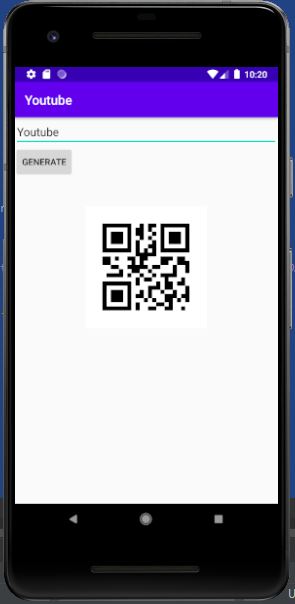
(5) If you want to see the video you can also watch below.
 Ketul Patel